PhonePe QR Code PVC Card – Print Your Shop QR on Durable PVC
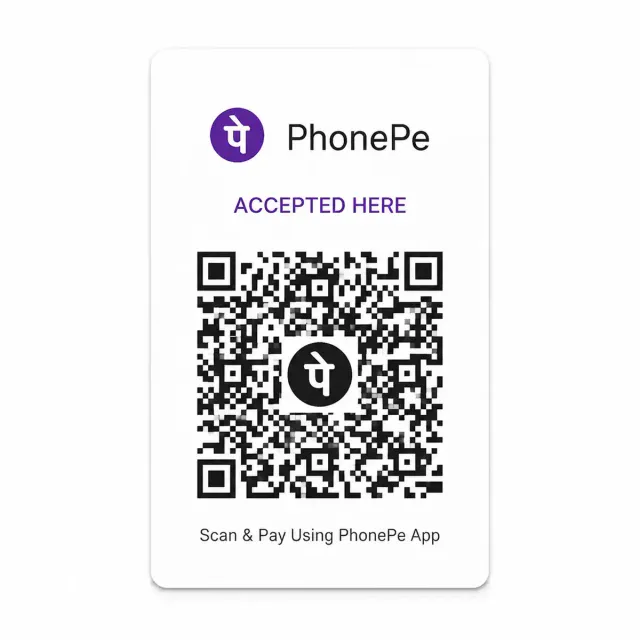
A PhonePe QR code PVC card puts your shop's PhonePe QR on firm plastic the size of a debit card, for ₹50. Upload the QR image or PDF, and your order is made in 1 day and delivered in 5 to 8 days. It is a private print of your own file, not issued by PhonePe.
Quantity: 1
Upload your card files*
Upload clear photos or a PDF of the front and back.
0 of 10 files
Cards for different people? Pick the quantity above, then add a file for each.
- Upload PDF, or the front and back files
- JPG, PNG, WebP or PDF, max 50 MB each
- Locked PDF? Add its password after upload
Delivery charges apply based on your location.
Estimated Delivery
Delivery by
Free Delivery on orders above ₹999.
Ordered
Order Ready
Delivered
A PhonePe QR code PVC card puts your shop's PhonePe QR on firm plastic the size of a debit card, for ₹50. Upload the QR image or PDF, and your order is made in 1 day and delivered in 5 to 8 days. It is a private print of your own file, not issued by PhonePe.
Walk past any chai stall, tailoring shop or vegetable cart and you will see it: a paper QR stuck to a box with tape, curling at the corners, with a customer holding the phone close and waiting for it to scan. That moment is the shopkeeper's income. When the paper fades or gets wet, scanning gets slow, and a slow scan costs sales. A firm PhonePe QR code PVC card fixes the problem, and this page shows how to get one made from your own PhonePe QR.
Please note one thing before anything else. What we print is a private copy of the QR file you give us. It is not issued by PhonePe, and it does not change your PhonePe account, your settlement or your UPI details in any way. We simply put your file on a durable card.
PhonePe QR Code PVC Card: What You Receive
A PhonePe QR code PVC card is a rigid plastic card with your shop's PhonePe QR on the front, and your shop details on the back if your file includes them. It is the size of a bank card, 85.6 mm by 54 mm, with rounded corners. It stands on a counter, sits in a small acrylic holder, or hangs from a cord near the till.
Every dot of the QR on a PhonePe QR code PVC card comes from your file. We do not redraw it, resize it incorrectly or add anything to it, so what customers scan is what you uploaded. That is why a clean, high-resolution QR file is the thing to look after.
Who Uses a Printed QR Card
Small sellers of every kind need one.
- Tea and snack stalls, where a wet counter ruins paper in a day.
- Vegetable and fruit sellers who work outdoors in sun and rain.
- Salons, tailors and repair shops with a steady stream of small payments.
- Delivery riders and autorickshaw drivers who want a card in the cab.
- Home bakers and tutors who keep a card in a bag for visits.
A phonepe qr code card made of plastic does not curl, does not tear when you pick it up, and wipes clean with a cloth. For a business that is taking money all day, that is a very small cost for a very large convenience.
PhonePe QR Code PVC Card: Finding Your File
Your PhonePe QR lives in the PhonePe Business app, where you can download or share it as an image or a PDF. Choose the option that saves the QR to your phone. If you have received your QR as a printed sticker from the company, take a flat, bright photograph of it instead.
Do not use a screenshot of the app screen with buttons and a clock showing, because the QR will be small and surrounded by clutter. Download the QR itself, so the file is just the code and your shop name. A clean file is what lets the PhonePe QR PVC card scan quickly.
What to Upload
For a PhonePe QR code PVC card, send one of these.
1. The QR image or PDF saved from the PhonePe Business app. This is the clean choice. 2. A flat scan of your existing printed QR. 3. A square-on photograph of a printed QR, taken in daylight.
Files up to 50 MB are accepted, in PDF, JPG, PNG or WebP. If the PDF is locked, upload it, then enter the password in the box that appears or tick that it opens without one. Our page has no field for your UPI ID or phone number, because your file already carries what you want printed.
How to Place Your PhonePe QR Code PVC Card Order
1. Press Upload files in the order box on this page. 2. Choose your QR file, and a second file for the back if you have one. 3. Type the password if a file asks for one. 4. Set the number of cards, between one and ten. 5. Add to cart, enter the delivery address and pay online.
You will see a progress bar for each upload, and a Retry link if a signal drops.
PhonePe QR Code PVC Card: Test Before Ordering
This step matters more here than for any other card. Open your file on a phone, then scan it with another phone using a UPI app. Does it open your shop name, and does the name match what you expect? Try it at arm's length and from a slight angle, as your customers will.
If it does not scan, do not order. Download the QR again from the app. A broken code on paper is annoying, and a broken code on plastic costs a reprint.
Making the QR Easy to Scan
A QR scans best when it is large, sharp and has an empty border around it. Do not crop the white margin, and do not add a coloured background behind the code. Avoid stretching the image, because it must stay square. If you photograph a printed QR, hold the phone directly above it, so the squares stay square.
Glossy plastic can reflect light. If your counter sits under a bright tube light, put the card in a holder that tilts it slightly, so reflections go elsewhere.
Slips That Cause Scanning Trouble
- A cropped QR with no white margin.
- A screenshot including buttons and a status bar.
- A photograph taken at an angle so the code looks like a diamond.
- A very small image enlarged until it looks blurry.
- A file with a coloured filter or a decorative frame over the code.
A Counter Set-Up That Works
A PhonePe QR code PVC card should face the customer without blocking the till. Scan it from the customer's side before deciding where the holder will stay.
Where the card sits matters nearly as much as the card. Put it at the customer's eye level or slightly below, facing them, with nothing hanging in front of it. Keep it about a forearm's length from where customers stand, because phone cameras struggle to focus on a code that is too close. A small stand or acrylic holder works well for a phonepe qr code card, and many stalls tie a card to a rod that rises above the goods so it can be seen from the queue.
If you have a hand-painted board, resist the urge to put the QR on the board itself. Wood, cloth and painted metal are poor surfaces. A separate card can be moved, wiped and replaced without touching the board.
A Daily Habit That Saves Trouble
Spend ten seconds each morning wiping the card and scanning it with your own phone. Check that the name which appears is yours, and if you need to print phonepe qr code copies for a spare counter, do it from the same clean file. This one habit catches a swapped sticker, a scratched code and a smudge before a customer finds it. Over a year it can save a good deal of awkward conversation at the counter, and a PhonePe QR code PVC card makes the wipe-and-scan routine quick.
Customers' Point of View
A customer who is in a hurry wants the scan to work on the first try. A flat card with a high-contrast code, such as a pvc phonepe qr, a clean surface and good lighting gives them that. A curled, sun-faded sticker forces them to hold the phone steady, move it about and sometimes give up and pay cash. Seen this way, the card is a small act of courtesy to the customer as well as protection for your own earnings.
Questions Shop Owners Often Raise
Can I print the QR I use for a second counter? Yes, if it is a code you are entitled to use, and place a separate order for it. Will I be told if the code stops working? Not by us, so test your cards from time to time. Does a phonepe qr card print need anything more than the file? No. Is it all right to print the QR with my shop name above it? Use the file exactly as the app gave you, since that is how it is checked for scanning. When you want to print phonepe qr code files with changes, make the change in the app, download the result and order from that file.
PhonePe QR Code PVC Card Price and Delivery
The ₹50 price includes both printed sides. Delivery is free for an order above ₹999. We make the cards in 1 day, and they reach you by courier in 5 to 8 days anywhere in India.
You can order one card or up to ten. A phonepe qr card print costs the same however many you order. Shops with more than one counter often order one for each, and a spare for the owner's pocket.
What This Card Is and Is Not
The card is a durable printed copy of your own QR, and a pvc phonepe qr keeps working as long as the file scans. It does not move money, it is not a payment device, and it does not make your PhonePe account better or worse. Payments, limits, settlements and any problem with your account are handled by PhonePe, and the PhonePe website is where to look for help with them. Please do not ask us to change a QR, generate a new one or alter any detail in it, because we only print what you send.
If you ever change your bank account or shop details in the app, download the new QR and order a fresh card. Take the old card out of use, so a customer is never paying into the wrong place.
Keep Your Payment Details Safe
A QR on a counter is public by design, but be careful with everything around it. Never share your PIN, a one-time password or a screenshot of your app with anyone. Do not hand your QR file to a person you do not know, and place the card where it cannot be covered by another sticker. Fraudsters sometimes paste their own code over a real one, so check your card at the start of each day.
Ordering for a Family Business
Several relatives sometimes run counters, and a phonepe qr pvc card for each keeps things tidy, each with their own PhonePe account. Place a separate order for each account, name the files clearly, and mark the back of each card in pencil with the person's name when it arrives. Cards with different QR codes are very easy to mix up.
Looking After Your PhonePe QR Code PVC Card
Wipe it with a soft dry cloth and keep it out of long, direct heat. A holder keeps it upright and out of spilled tea. If a PhonePe QR code PVC card gets scratched across the QR, replace it, since a damaged code may not scan. Reorder from the same file for ₹50.
After You Pay
Check every PhonePe QR code PVC card in the parcel against your current QR. Confirm the recipient before distributing copies to other counters or staff.
You get a confirmation email for your PhonePe QR code PVC card at once, then updates as the parcel moves. Look up your order any time on the track your order page.
More QR Cards and Related Items
- A Paytm QR code PVC card for a Paytm account.
- A Google Pay QR code PVC card for Google Pay.
- A PVC PAN card for business paperwork.
- The whole PVC cards collection, and our PVC card printing by city and state pages.
Is this an official PhonePe card?
No. It is a private print of the QR file you upload and is not issued by PhonePe.
Will the QR still scan?
It scans if your file scans. Test the file with another phone before you order.
Can I order cards for more than one shop?
Yes, up to ten cards in an order. Use a separate order for each account.
Do you need my UPI ID or phone number?
No. We never ask for payment details on our page. Only upload the file.
How long will it take to arrive?
Cards are made in 1 day and arrive in 5 to 8 days across India.
What if my QR changes?
Download the new QR and place a new order for a PhonePe QR code PVC card. Stop using the old one.
Upload the highest resolution photo you have for the sharpest print. We warn you before you order if a photo may print soft at the size you chose.
Every order is made after you place it. Allow 1 day to prepare it and 4 to 7 days for delivery across India. Shipping is free on orders above ₹999 and ₹60 below that. Read our shipping policy.
If your order arrives damaged or defective, contact us within 7 days of receiving it. Once the returned product reaches us and is verified, your refund is processed within 24 hours. Personalized items cannot be returned for a change of mind once printing has started. Read our return and refund policy.
Need help uploading images or adding details? Call or WhatsApp +91 9529240029, email [email protected], contact us, or see the FAQs.