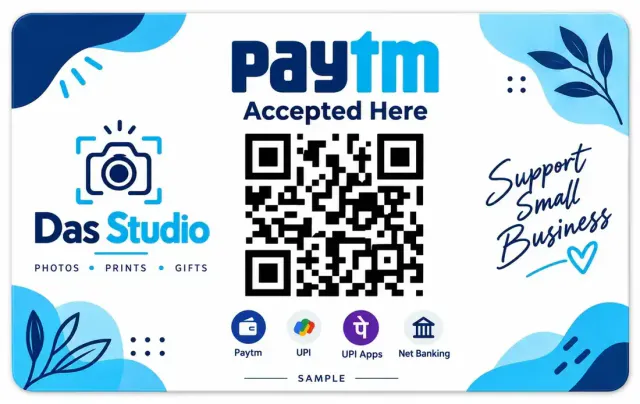
Paytm QR Code PVC Card – Print Your Existing Payment QR
A Paytm QR code PVC card puts your shop's existing QR artwork on wallet-size plastic for ₹50. Upload the image or PDF for a private print, made in 1 day and delivered in 5 to 8 days. This product is not issued by Paytm and does not create or change a payment account.
Quantity: 1
Upload your card files*
Upload clear photos or a PDF of the front and back.
0 of 10 files
Cards for different people? Pick the quantity above, then add a file for each.
- Upload PDF, or the front and back files
- JPG, PNG, WebP or PDF, max 50 MB each
- Locked PDF? Add its password after upload
Delivery charges apply based on your location.
Estimated Delivery
Delivery by
Free Delivery on orders above ₹999.
Ordered
Order Ready
Delivered
A Paytm QR code PVC card puts your shop's existing QR artwork on wallet-size plastic for ₹50. Upload the image or PDF for a private print, made in 1 day and delivered in 5 to 8 days. This product is not issued by Paytm and does not create or change a payment account.
Paytm made the QR code a familiar sight in India long before almost everyone knew what UPI was. Plenty of shopkeepers still point to the little blue-and-white square on their counter as the way to pay. If yours is printed on thin paper, though, you already know its habits: it yellows, it peels at the corners and the shine from a ceiling light makes it hard to scan. A tough Paytm QR code PVC card solves all three, and this page explains how to get one made from your own Paytm QR file.
First, a plain statement. We print a private copy of the QR file you upload. It is not issued by Paytm, and it does not change your Paytm account, your settlements or your bank details. All we do is put your own file on a durable card.
What a Paytm QR Code PVC Card Is
A Paytm QR code PVC card is a rigid plastic card that carries your shop's Paytm QR. It is the size of a bank card, 85.6 mm by 54 mm, with rounded corners, so it fits a small stand, a counter holder or a lanyard cord.
The QR itself comes straight from your file. We never redraw, tidy or enlarge it by guesswork, so the code your customers scan is exactly the code you supplied. The one thing you control is the quality of the file, and the sections below explain how to get that right.
Shops and People Who Use a Paytm QR Card
Plenty of different sellers keep a printed QR close.
- Neighbourhood grocers and general stores with a busy counter.
- Milk, newspaper and tiffin vendors who collect payments at doorsteps.
- Doctors, tutors and trainers who accept fees by scan.
- Landlords and paying-guest owners who collect rent.
- Market stalls and festival sellers who set up in a different spot each week.
Anyone who moves around benefits most from a paytm qr card print, because a plastic card goes into a bag without bending, and out again without a crease.
Paytm QR Code PVC Card: Getting Your File
Your QR is available inside the Paytm for Business app, where you can download it or share it as an image or a PDF. Save it to your phone rather than taking a picture of the screen. If you only have an old printed QR, scan it flat or photograph it straight from above in good light.
A tidy file shows the code with its margin and your shop name. Avoid files with the whole app screen visible, since the buttons and clock only make the code smaller.
What to Send
A Paytm QR code PVC card should display only the artwork you intend to make public. Keep unrelated private documents out of the source, while retaining the code's full white border.
For a Paytm QR code PVC card, any of these will do.
1. The QR image or PDF saved from the app. This gives the sharpest print. 2. A flat scan of your printed QR. 3. A straight-on photograph in daylight, with all four corners visible.
Files may be up to 50 MB, in PDF, JPG, PNG or WebP. A password-protected PDF is fine too: after upload, a box lets you enter the password or say it opens without one. We do not ask for a phone number, an account number or a UPI address on our page.
Placing Your Paytm QR Code PVC Card Order
Start at the order box on this page and press Upload files. Pick your QR file, add a second file if you want something different on the back, and type the password when a protected PDF asks for it. Choose how many cards you want, from one to ten, then add to cart, enter the delivery address and pay online.
A bar fills as each file uploads. When the signal wobbles, press Retry on the file that stalled and carry on with the rest.
Paytm QR Code PVC Card: Scan Before Ordering
Open your file on one phone and scan it with a second phone. The shop name that appears should be yours, and the payment page should open without delay. Hold the phone at arm's length and at a slight angle, as customers do. If the code does not scan from your file, it will not scan from the card either, so download the QR afresh and test again before you place the order.
Ways to Keep the Code Scannable
QR codes need three things: size, contrast and a clear border. Do not crop the white margin, do not place a coloured picture behind the code and do not stretch it out of square. Keep the card flat and keep reflections away from it. A matt holder or a slight tilt can stop a tube light from washing out the code.
Do not let a sticker, a price tag or a piece of tape cross any part of the code. Even a small mark across one corner can slow a scan.
Things That Go Wrong With QR Files
A few habits cause nearly all the trouble. Some owners crop the white border off the code to make it look bigger. Others send a screenshot that still shows the app's buttons. A third group photographs a printed code from the side, so the squares lean. And a few enlarge a very small image until it turns soft. Each of these makes scanning harder, and none can be repaired once the card is made.
Paytm QR Code PVC Card Cost and Arrival
A Paytm QR code PVC card costs ₹50 with both sides printed. An order above ₹999 gets free delivery. We make the cards in 1 day, and they travel by courier for 5 to 8 days to anywhere in India.
You can order one card or ten. A shop with two billing counters might order two, plus one for the owner, and a set of paytm qr pvc card copies makes sense for anyone with several stalls.
Choosing Where to Put the Card
At a counter, the card works best at eye level for the customer, a forearm's length from where they stand. On a delivery bag or a vendor's cart, hang it from a cord so it faces outward. For rent or tuition fees, a card in a small stand on the desk is enough. Avoid placing it beside a reflective surface, such as a glass display, where light bounces straight back at the phone camera.
If you work in more than one place, keep one card at each spot rather than carrying a single card around, because the card that is not in your hand cannot be lost. This is a good moment to buy a paytm qr code card for each location.
Giving Customers a Smooth Experience
Place your Paytm QR code PVC card where someone can scan without leaning across another customer's purchase. Check the position with a phone before fixing the holder in place.
Customers are patient with a card that scans first time and impatient with one that does not. Put a small line of text near the card, such as your shop name, so people can confirm they are paying the right place. Keep the area around the card tidy, and do not stack coins, receipts or signs in front of it.
If a customer's phone is slow to scan, do not wave the card about. Hold still, let the camera focus, and the code will be read. A flat, rigid card makes that easy, because the code is not moving.
A Few Words for Seasonal and Event Sellers
Fairs, weddings, exhibitions and festival stalls need a QR for a few days only, and the card must survive being packed, unpacked and moved. A plastic card goes into a box without a fold, and it can be wiped between events. Order a spare before the season starts, so you are not waiting for a courier when the crowd arrives.
What It Is and What It Isn't
The card is a printed copy of a code you already own, and a pvc paytm qr is no more than that. It does not process payments, it is not a payment device and it does not make your account safer or riskier. Payments, limits, settlements and any problem with the account are handled by Paytm, so contact them about those. The Paytm website is the place to start.
We cannot generate a QR for you, edit one or change a detail in it. If your bank account changes, get a new QR from the app, order a new card and stop using the old one at once. You can print paytm qr code files as often as your details change.
Staying Safe Around a Public QR
Inspect the Paytm QR code PVC card whenever you reopen a stall after moving it. A swapped card can look familiar from a distance, so read the recipient on your own phone as well.
Your QR is meant to be seen, but the things around it should not be. Never share your PIN or an OTP with anyone who asks, even someone who says they are from the company. Look at your card every morning, because some fraudsters paste their own code over a real one. When a payment comes in, check the notification before handing over goods.
For Shops With More Than One Account
Keep a record of which Paytm QR code PVC card belongs at each counter. Ask the person responsible for that account to confirm the file before you order extra copies.
Family businesses sometimes run several Paytm accounts, one for each counter or person. Place a separate order for each account, label the files clearly, and write a small name on the back of each card when it arrives. Codes for different accounts look alike, and mixing them up sends money to the wrong place.
Everyday Care for Your Paytm QR Code PVC Card
A soft dry cloth is enough, and a counter holder keeps the card upright and out of spills. Do not park it on a hot surface for hours. When the plastic is scratched across the code, retire it and order another from the same file. A fresh Paytm QR code PVC card costs ₹50.
After You Order
Check your Paytm QR code PVC card against the saved artwork as soon as it arrives. Test the print before putting spare copies into storage so you know they are ready for use.
A confirmation email arrives as soon as you pay, then updates as the parcel moves. The track your order page shows where it is.
Other QR Cards
- A PhonePe QR code PVC card for a PhonePe account.
- A Google Pay QR code PVC card for Google Pay.
- A PVC PAN card for business paperwork.
- The whole PVC cards collection, and our PVC card printing by city and state pages.
Is this an official Paytm card?
No. It is a private print of the QR file you upload and is not issued by Paytm.
Will the QR scan?
It scans if the file scans. Test the file with another phone first.
Can I order cards for several counters?
Yes, an order takes up to ten cards. Different accounts need different orders.
Do you need my account details?
No. The QR file is all we need, and our page never asks for payment details.
How long does delivery take?
We make them in 1 day, and the courier brings them in 5 to 8 days.
What if I change my bank account?
Get the new QR from the app, order a fresh card and retire the old one.
Upload the highest resolution photo you have for the sharpest print. We warn you before you order if a photo may print soft at the size you chose.
Every order is made after you place it. Allow 1 day to prepare it and 4 to 7 days for delivery across India. Shipping is free on orders above ₹999 and ₹60 below that. Read our shipping policy.
If your order arrives damaged or defective, contact us within 7 days of receiving it. Once the returned product reaches us and is verified, your refund is processed within 24 hours. Personalized items cannot be returned for a change of mind once printing has started. Read our return and refund policy.
Need help uploading images or adding details? Call or WhatsApp +91 9529240029, email [email protected], contact us, or see the FAQs.