APAAR ID PVC Card – Print Your Student APAAR ID on Durable PVC
An APAAR ID PVC card puts a student's APAAR ID on firm plastic the size of a debit card, for ₹50. Upload the DigiLocker PDF or clear photos of both sides, and your order is made in 1 day and delivered in 5 to 8 days. It is a private print, not issued by the Ministry of Education.
Quantity: 1
Upload your card files*
Upload clear photos or a PDF of the front and back.
0 of 10 files
Cards for different people? Pick the quantity above, then add a file for each.
- Upload PDF, or the front and back files
- JPG, PNG, WebP or PDF, max 50 MB each
- Locked PDF? Add its password after upload
Delivery charges apply based on your location.
Estimated Delivery
Delivery by
Free Delivery on orders above ₹999.
Ordered
Order Ready
Delivered
An APAAR ID PVC card puts a student's APAAR ID on firm plastic the size of a debit card, for ₹50. Upload the DigiLocker PDF or clear photos of both sides, and your order is made in 1 day and delivered in 5 to 8 days. It is a private print, not issued by the Ministry of Education.
School bags are rough places. Notebooks are squashed in, water bottles leak, and a paper printout of a student's APAAR ID rarely survives past the first term. If you have the APAAR ID on a phone or as a printout and would like a hard-wearing card for it, you are in the right place, and the steps below are short.
Before going further, a plain statement. The card we print is a private copy of the APAAR ID file you give us. It is not issued by the Ministry of Education or by any school, board or university, and it does not replace the official ID or the digital record. It is a sturdy duplicate for the student's own convenience.
APAAR ID PVC Card: Understanding the Student ID
APAAR stands for Automated Permanent Academic Account Registry. It is a lifelong academic ID number for a student, and it is linked to the student's academic records, such as marks and certificates, kept in digital form. The idea is that one number follows a student from school into college, so records do not have to be rebuilt each time.
The ID is usually created with the help of the school, and for a child it needs a parent's or guardian's consent. Once it is made, the student or the family can see it on the official portal or in DigiLocker, and many download the ID card as a PDF. That PDF is the file you can use here.
What an APAAR ID PVC Card Looks Like
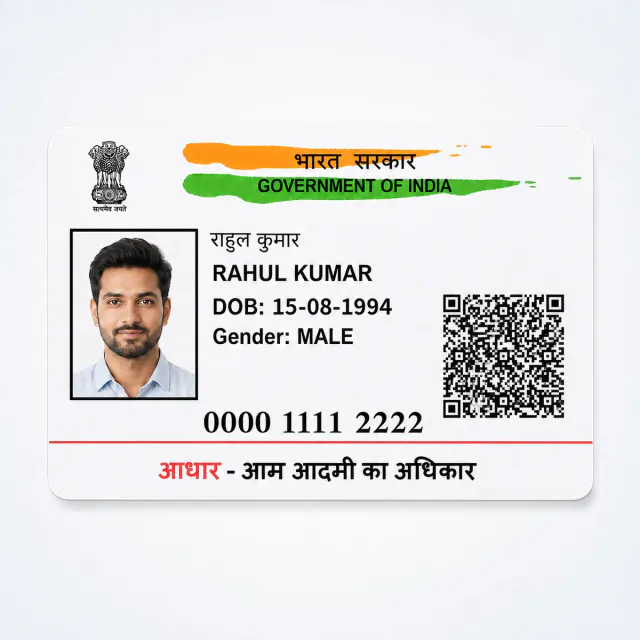
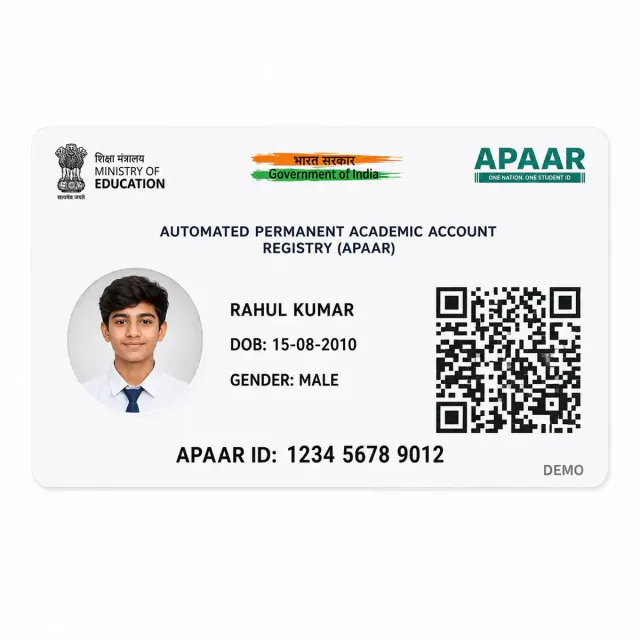
An APAAR ID PVC card is the same ID, printed on a firm card measuring 85.6 mm by 54 mm with rounded corners, which is the size of a bank card. The front has the student's photograph, name and APAAR number, and the reverse carries a record panel and a QR code, as your file does.
We do not retype or rearrange anything. Whatever your file shows is what the card shows, in the same place. A spelling mistake in the file will reach the card, which is why we suggest you read it carefully before ordering.
Why Families Order It
The reasons are simple and mostly about wear and tear.
- The paper printout is folded into a school diary and goes soft in a week.
- A phone is not always allowed in school, so a card is easier to carry.
- Children lose things, and a spare saves a trip to download the file again.
- Coaching centres, hostels and libraries often like to see a proper ID.
- Parents like to keep one card at home with the other family documents.
An apaar card pvc copy fits the same pocket as a school identity card, is hard to misplace and survives a monsoon walk home.
APAAR ID PVC Card: Choosing Your File
For an APAAR ID PVC card, use the student's current document rather than an admission form that happens to mention their number. The file itself supplies the printed details.
For an apaar id pvc card order, any of these will do.
- The APAAR ID card PDF downloaded from DigiLocker or the official portal. It gives the sharpest text and QR code.
- A scan of the printout you were handed, front and back.
- Clear photographs of both sides taken in daylight on a plain table.
Files can be up to 50 MB and can be PDF, JPG, PNG or WebP. If the PDF opens only with a password, upload it, then type the password into the box that appears afterwards, or tick that it needs none. Our page never asks you to type the APAAR number, because the file already holds it.
How to Order Your APAAR ID PVC Card, Step by Step
1. Tap Upload files in the order box. 2. Choose the PDF, or the photographs of the front and back. 3. Type the password if a file asks for one. 4. Select how many cards you want, from one to ten. 5. Add to cart, enter the delivery address and pay online.
Each file shows a progress bar while it uploads, and a failed upload can be retried with one tap.
APAAR ID PVC Card Orders and Children's Files
Before ordering an APAAR ID PVC card for a child, the parent or guardian should check what the uploaded document reveals. Include only the document intended for printing.
A student's ID file carries a child's photograph and details, so handle it with care. Upload it only yourself, as a parent or guardian, or with their permission if they are older. Do not forward the file through public groups, and delete extra copies from shared devices after you have ordered. We use the file only to make the card you ordered.
If you are a school coordinator handling many students, ask for each family's consent, and keep each student's order separate so the cards are never mixed.
Getting a Clean Print
A clean file gives a clean APAAR ID PVC card. Open the PDF at full size and check that the photograph is sharp, the name is readable and the QR code shows crisp squares. If you are photographing a printout, put it flat on a table, take the picture straight from above and avoid the shine of a ceiling light.
Do not photograph a screen showing the ID. The pattern of the display and any glare will show up in print. Use the PDF or a flat scan instead.
Mistakes That Spoil a Student ID Print
- Cropping the file so tightly that the QR code loses an edge.
- Sending only the front, when the reverse has the record panel.
- Using a thumbnail saved by a chat application, which is much smaller than the original.
- Mixing two children's files in one order.
- Uploading a screenshot with the status bar and a notification across the photograph.
What Is Different About a Student's Card
An adult's card is mostly about wallets and counters. A student's card lives a harder life. It goes into a bag pocket, a lanyard sleeve or a hostel cupboard, and it often has to be shown quickly to someone who is busy. That is why a rigid card, with rounded corners that do not snag, suits a student better than a printout stapled to a form.
Think also about the years ahead, and about an apaar id card pvc copy that lasts them. The APAAR number is meant to stay with the student through school and higher study. An APAAR ID PVC card made now will still carry the right number later, and if the plastic wears out you can always order another from the same file.
If You Cannot Find the File
Parents sometimes remember that the school created the ID but cannot say where the PDF went. Start with the phone or email that was used when the ID was created, then check the DigiLocker account linked to it. The school office can also tell you whether the ID was made and how to see it. Once you have the file, the order itself takes only a few minutes.
If only a printout is available, scan it flat rather than photographing it at an angle, and keep fingers and shadows out of the picture.
Questions Parents Often Ask Before Ordering
Is it safe to upload a child's ID for an APAAR ID PVC card order? Your file is used only to make the card you asked for. Share it from your own phone, not from a shared computer, and keep the original in your own storage.
Will the card carry anything extra? No. It shows only what the file shows, with nothing added.
Can the same file make several cards? Yes. Set the quantity to the number you want, up to ten, and all the cards are identical.
What if the student changes school? The number belongs to the student and does not depend on the school, though the school name on the record may change. If your file is updated, upload the new one and order a fresh card.
The photograph is the first thing anyone looks at on a student ID, so check it. It should be clear, front-facing and not cut at the edges. If the photograph in the file is dark or blurred, the card will be dark or blurred. A pvc apaar card cannot fix a poor picture, and only a new file from the source can fix that. Ask the school whether the picture can be updated before you place the order, since an apaar id card print will carry it exactly.
APAAR ID PVC Card Price and Delivery
An APAAR ID card costs ₹50 for each card, printed on both sides. Delivery is free once the order goes above ₹999. We make the cards in 1 day, and they reach you by courier in 5 to 8 days anywhere in India.
You can order one card or ten. Families with two or three children often order an apaar id card print for each child, plus a spare, and add other documents to the same cart to reach free delivery.
When the Card Gets Used
A printed copy is useful in ordinary student life. Anyone who holds an apaar id card pvc copy will notice how often a student ID is asked for. Some places that ask for a student ID are happy with a clear copy: a library, a coaching centre, a hostel desk, a scholarship office. Others will ask only for the original or for the digital record. Rules differ from one institution to another, so check what yours accepts. We do not claim that any school, university or office will accept this card in place of an official one.
For anything about getting an APAAR ID, correcting details or understanding what it is used for, the official APAAR portal is the right place.
If Details Look Wrong
We cannot alter what your file says. If the name is spelled differently from the school record, or the date of birth does not match, the card will show the same thing. Ask the school to correct the record, wait for the updated ID, and then upload the new file. It saves you a card you would not want to use.
Schools, Colleges and Group Orders
Some teachers and coordinators order for a whole class. An apaar card pvc order for a class is possible, but please place a separate order for each student so every file stays with its own set of cards, and name each file with the student's first name and class. Do this only with the family's agreement, and print apaar id card copies only for students whose families have said yes. Group orders can make free delivery easy, and ten cards are the most that fit into a single order, so a large class simply needs a few orders.
Looking After the Card
Treat your pvc apaar card like any other plastic card. Wipe it with a soft dry cloth. An APAAR ID PVC card should not be left in a hot car or on a sunny windowsill for hours, because any plastic card may warp. Avoid carrying it loose at the bottom of a bag with keys and coins. If it is lost or gets scratched, upload the file again and order another for the same ₹50.
After You Pay
When the APAAR ID PVC card reaches you, ask the student or guardian to check the name and number. Keep it with the student's own papers so it is not confused with a sibling's card.
An email confirms the order straight away. The cards are made in 1 day and sent by courier, with updates by email as the parcel moves. You can look it up at any time on the track your order page.
Other Cards in the Same Cart
A family usually holds more than one ID, and they all print the same way.
- A PVC Aadhaar card for each family member.
- An ABHA card for the digital health account.
- A PVC PAN card for an adult or an older student.
- The full PVC cards collection, and our PVC card printing by city and state pages.
Is this the official APAAR ID card?
No. It is a private print of the file you upload and is not issued by the Ministry of Education or by any school. Keep the original ID or digital record for official use.
Can I print the APAAR ID from DigiLocker?
Yes. If you have saved the ID card PDF from DigiLocker or the portal, upload that file and we print what it shows. You can print apaar id card files this way without any other documents.
Can a parent place the order?
Yes. In fact it is usually the parent who does, since the student's file belongs to the family.
How many cards can I order?
Up to ten in one APAAR ID PVC card order. Use a separate order for each student.
How long does delivery take?
Cards are made in 1 day and arrive in 5 to 8 days across India.
Do I need to enter the APAAR number?
No. Only upload the file. We print what the file shows and never ask for the number on our page.
What if the card is lost?
Upload the same file again and place a new order at the same price.
Upload the highest resolution photo you have for the sharpest print. We warn you before you order if a photo may print soft at the size you chose.
Every order is made after you place it. Allow 1 day to prepare it and 4 to 7 days for delivery across India. Shipping is free on orders above ₹999 and ₹60 below that. Read our shipping policy.
If your order arrives damaged or defective, contact us within 7 days of receiving it. Once the returned product reaches us and is verified, your refund is processed within 24 hours. Personalized items cannot be returned for a change of mind once printing has started. Read our return and refund policy.
Need help uploading images or adding details? Call or WhatsApp +91 9529240029, email [email protected], contact us, or see the FAQs.